Outstation & Airport Dispatch Automation: Eliminating Dispatch Bottlenecks
Learn how outstation and airport dispatch automation eliminates dispatch bottlenecks, improves trip allocation, and streamlines fleet operations for better efficiency.
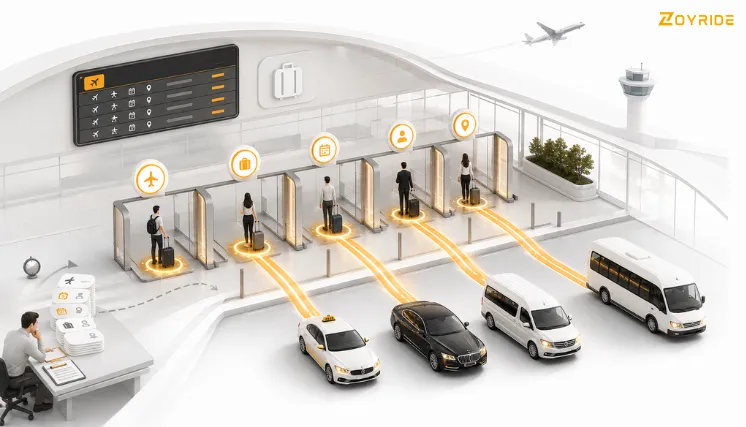
Outstation trips and airport transfers are the two hardest bookings to dispatch manually. An outstation trip ties up a vehicle for hours or days—often across city lines—while an airport pickup cannot shift even fifteen minutes without risking a missed flight connection. When both trip types run through the same fleet, a dispatcher is forced to make trade-off decisions on the fly: which driver returns first, which car is closest to the terminal, and which ride can afford to wait.
For operators running a single city, this can be managed with calls and spreadsheets. For operators running multiple cities or mixing outstation and airport demand, manual dispatch stops scaling. This is where modern outstation taxi dispatch software, paired with an airport transfer management system, removes the guesswork and keeps local, outstation, and airport trips moving on one connected network.
Why Outstation and Airport Trips Create Dispatch Bottlenecks
Local city rides are short and repeatable, meaning a manual dispatch process can absorb small operational inefficiencies. Outstation and airport trips offer no such room for error.
- Extended Vehicle Lockout: An outstation trip removes a vehicle from the local pool for an extended duration. If a dispatcher fails to track when and where that driver becomes free, the vehicle sits idle after drop-off or gets double-booked before returning.
- Fixed Arrival Windows: Airport trips carry strict timing windows dictated by flight schedules rather than passenger preference. Any delay in assigning or dispatching a driver directly increases the risk of a missed pickup.
- Compounding Complexity: Managing regular city bookings alongside long-distance and airport transfers forces dispatchers to juggle three distinct timing logics simultaneously over phone calls and messaging apps.
What Breaks Down When Dispatch Stays Manual
Operational friction routinely appears in fleets that rely on manual dispatch processes:
- Delayed Status Updates: Drivers returning from outstation trips are not marked available until a coordinator manually updates the system, causing nearby bookings to be assigned to distant vehicles.
- Occupied Dispatchers: Airport pickups get assigned late because coordinators are busy manually confirming outstation departures.
- Double-Booking Risk: The same driver receives multiple trip offers because updates are fragmented across calls, texts, and spreadsheets.
- Zero Multi-City Visibility: Fleet owners operating across multiple locations lack a unified real-time view of which vehicles are on long-distance duty, which are idle, and which are staged near airport hubs.
These breakdowns are not driver errors—they are coordination failures that automated driver trip allocation software is specifically designed to solve.
How Automated Driver Trip Allocation Software Solves This
Automated trip allocation replaces manual guesswork with system rules evaluated every time a booking enters the queue:
- Live Availability Tracking: The system logs exact driver availability in real time—automatically clearing outstation drivers the moment their return leg finishes without requiring manual coordinator input.
- Proximity and Category Matching: For airport transfers, the system assigns the nearest available vehicle in the required category rather than relying on dispatcher memory.
- Compliance and Duty Hour Verification: The system checks driver shift limits and regulatory compliance before dispatching long outstation routes.
- Return-Leg Optimization: Once an outstation destination is logged, the system holds the driver’s return window open for incoming bookings in the target location instead of leaving return trips to chance.
Key Operational Differences: Manual vs. Automated Allocation
Driver Status Clearing
- Manual Process: Dependent on drivers calling in or coordinators manually entering status updates.
- Automated System: Instant and automatic status clearing as soon as the GPS confirms trip completion.
Airport Delay Management
- Manual Process: Dispatchers must manually monitor flight status sites and adjust schedules by hand.
- Automated System: Real-time integration with flight tracking APIs automatically updates driver pickup ETAs.
Driver Assignment Logic
- Manual Process: Decisions made under pressure based on dispatcher preference or memory.
- Automated System: Rules-based selection evaluating proximity, vehicle class, and driver availability.
Fleet-Wide Visibility
- Manual Process: Information is isolated within local regional branches.
- Automated System: A unified, live dashboard providing visibility across all cities and operating hubs.
Unifying Operations Under an Airport Transfer Management System
Airport transfers require specific operational handling. An airport transfer management system embeds airport-specific logic directly into the central dispatch flow:
- Automated Flight Tracking: Live flight integrations monitor delay and early arrival data, updating driver pickup times automatically without phone calls.
- Terminal and Gate Dispatch: Flight details, terminal designations, and meeting points attach directly to the driver’s mobile application.
- Automated Reassignment Guards: If a driver assigned to an airport pickup encounters heavy traffic or extended delays, the system automatically reassigns the booking to the nearest alternative driver.
When long-distance and airport dispatch run on the same platform, a driver completing an outstation trip becomes eligible for an airport pickup the moment they enter the target zone.
Multi-City Fleet Management Software: Coordinating Across Locations
Operating across multiple municipalities compounds dispatch challenges. Outstation trips originating in one city routinely end in another. Without a shared management system, the destination fleet lacks visibility into incoming vehicles until drivers physically report in.
Deploying multi city fleet management software connects regional branches into a unified operational network:
- Immediate Inventory Recapture: A vehicle ending an outstation trip in a secondary city displays as active inventory in that market immediately.
- Cross-Regional Visibility: Dispatchers across all locations access driver shift logs, live GPS positions, and vehicle categories fleet-wide.
- Inter-City Asset Staging: High-demand airport pickup zones in any city can draw from incoming outstation vehicles already in range, maximizing asset utilization.
Operational Scenario: Outstation and Airport Trips Colliding
Consider a fleet operator managing vehicles across two regional hubs with active outstation bookings and scheduled airport runs. A vehicle departs on a multi-day outstation route while three early-morning airport pickups are scheduled in the receiving city.
- Without Automation: The destination dispatcher lacks real-time return data for the outstation vehicle, excluding it from airport assignment. Local drivers are stretched thin to cover all three runs, leading to scheduling delays.
- With Automated Allocation: The system tracks the outstation vehicle’s expected completion time. Once marked clear, the driver is automatically inserted into the dispatch queue for the next matching airport pickup in range—optimizing asset turnover without manual intervention.
Evaluating Dispatch Automation Platforms
When selecting an automated dispatch platform for multi-city, outstation, and airport operations, verify the presence of these core capabilities:
- Automatic Availability Updates: Trip completion logic that clears driver status automatically.
- Flight Telemetry Integration: Live status updates, terminal data, and automated driver alerts.
- Compliance Verification: Automated tracking of driver duty hours for long-distance trips.
- Unified Multi-City Dashboard: Real-time visibility into driver fleets across all operating territories.
- Automated Exception Reassignment: Dynamic trip reassignment when drivers experience traffic delays or route failures.
Connecting your operational workflows inside a unified ****Taxi Booking Software suite ensures local, airport, and outstation trips run on a single platform. For broader oversight, link dispatch operations to a dedicated Fleet Management System and review our specialized ****Airport Transfer Dispatch Guide.
Final Thoughts
Outstation and airport operations present distinct dispatch challenges that break manual tracking systems, particularly across multi-city footprints. Implementing automated driver trip allocation alongside an airport transfer management system and multi-city fleet management software replaces manual coordination with reliable operational rules. Drivers clear instantly upon trip completion, airport pickups adjust to real-time flight changes, and fleet assets remain visible across every operating hub.
Unify Your Outstation & Airport Dispatch
Streamline multi-city trip allocation, automate airport pickups, and eliminate fleet bottlenecks with Zoyride.
Start Free Trial | Talk to Our Fleet Specialists
Frequently Asked Questions
1. Can dispatch software track when a driver becomes free after an outstation trip?
Yes. The software logs the completed outstation trip and automatically sets the driver’s status to available in the central system without requiring manual input.
2. How does automated allocation handle flight delays for airport pickups?
The platform integrates with live flight tracking APIs to monitor schedule changes. When a flight is delayed or arrives early, the system adjusts the pickup ETA and notifies the assigned driver automatically.
3. Can a driver returning from an outstation trip be assigned an airport pickup in a different city?
Yes. When multi-city fleet management software is enabled, the platform treats vehicles across all operating locations as a unified network, assigning return drivers to local pickups based on proximity and category matching.
4. Does the system check driver duty hours before assigning long outstation trips?
Yes. Automated compliance checks evaluate driver shift logs and remaining duty hours against route requirements before assigning an outstation trip.
5. Is automated allocation beneficial for single-city fleet operations?
Yes. Even within a single city, automated allocation prevents long-distance and airport bookings from conflicting with local demand by managing driver availability and assignment logic automatically.