How to Let Customers Book Rides Directly From Your Website With Zoyride Plugin
Let customers book rides directly from your website with Zoyride’s taxi booking widget. Increase direct bookings and reduce reliance on third party platforms.
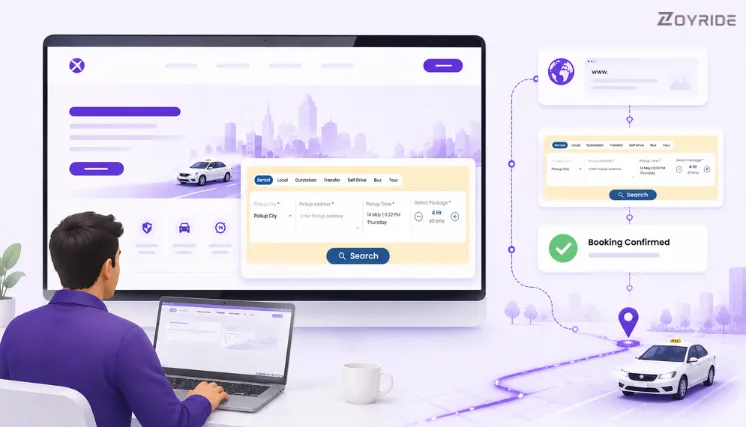
A potential customer lands on your website. They want to book a cab. They look around, find a phone number, and call. Your line is busy. They leave and book with someone else.
This happens more often than most transport businesses realise. A website without a direct booking option captures attention but loses the conversion. Every visitor who can’t book on the spot is a potential trip lost.
Zoyride’s built-in booking widget fixes this. It embeds a fully functional online cab booking system directly on your website — customers select their trip type, browse vehicles with fare breakdowns, confirm the booking, and download their ticket without ever leaving your site. No app required. No redirect to a third-party platform. And for Zoyride clients, no development work needed — the team sets it up for you.
✓ Included in all Zoyride plans ✓ No extra cost ✓ Setup handled by the Zoyride team
Every Trip Type, One Widget
A single embedded transport booking widget on your website handles all of the following:
- Rental — hourly cab packages (4 hr / 40 km, 8 hr / 80 km, and custom packages you configure)
- Local — point-to-point bookings within the city
- Outstation — intercity trips, one-way and round-trip
- Transfer — airport pickups and drops, hotel and station transfers
- Self Drive — vehicle rental without a driver, with date and duration selection
- Bus — group and shuttle bookings for fixed or on-demand routes
- Tour — multi-stop sightseeing and travel packages
Each trip type shows the relevant fields automatically — a customer booking an outstation trip sees a different form than one booking an hourly rental. The widget handles the logic.
How a Customer Books — Step by Step
Step 1 — Select trip type and enter pickup details
The customer picks their trip type from the tabs at the top of the widget — Rental, Local, Outstation, Transfer, Self Drive, Bus, or Tour. They then enter the pickup city, address, date, and time. For rental bookings, the package selector shows duration and kilometre options directly in the widget.
Step 2 — Browse vehicles with fare breakup
Available vehicle categories appear with a transparent fare breakdown — base fare, taxes, and applicable charges shown clearly before the customer commits. No hidden amounts revealed at checkout. This is one of the most effective ways to reduce pre-booking enquiry calls, since the taxi fare calculator is built into the widget itself.
Step 3 — Add passenger details and confirm
The customer enters their name, contact number, and any special instructions, then confirms the booking. Payment collection — upfront or on service — is configured based on your account settings.
Step 4 — Download ticket and manage cancellations
On confirmation, the customer receives a downloadable booking ticket. Cancellations are managed directly through the booking confirmation — no need to call your office. On your end, every booking from the widget appears in your Zoyride dashboard instantly, assigned and tracked alongside all other bookings in the system.
Every booking made through your website flows directly into your Zoyride dispatch dashboard — no manual entry, no separate inbox to check.
What It Means for Your Business
- Direct bookings, zero commission. Customers who book through your website pay no platform fee — the full fare comes to you. Your own website becomes a revenue channel, not just a brochure.
- Round-the-clock bookings without staff. The widget takes reservations at any hour without anyone needing to be available. For outstation and tour bookings planned days in advance, this removes a real revenue gap.
- Fewer enquiry calls. Fare transparency at the vehicle selection step eliminates most “how much will it cost?” calls before booking. Customers see the full breakup and confirm — or don’t — on the spot.
- No new workflow to manage. Because the widget connects to your existing Zoyride taxi booking software, website bookings don’t create a separate process. Dispatch, tracking, and reporting all happen in the same place.
- Works on all devices. The widget is fully responsive — desktop, tablet, and mobile. A customer researching trip options on their phone completes the same booking flow as a desktop user.
How Setup Works
This is where Zoyride’s approach is different from a standard taxi booking plugin for website. You don’t embed a widget yourself and troubleshoot the configuration. Zoyride’s team handles the setup for you.
Once your account is active with your trip types, vehicle categories, and pricing configured, the Zoyride team sets up the booking widget on your website quickly. You tell them what you need — which trip types to show, what the default package should be, how you want payments handled — and the team takes it from there.
If you’re already a Zoyride subscriber and haven’t enabled the booking widget on your website yet, reach out to the support team. If you’re evaluating Zoyride, the widget is live and demonstrable during the free trial period.
Final Thoughts
Most transport businesses spend time and money building a website and then leave it as a static presence — something visitors read but can’t act on. A cab booking website integration turns that presence into a direct booking channel that works continuously, requires no staff to operate, and feeds every booking into the same system you already use.
For taxi operators, outstation providers, self-drive rental businesses, and airport transfer services, the booking widget is one of the most practical things you can add to your website — and for Zoyride clients, it’s already included.
See the booking widget in action.
Start taking bookings directly from your website — no development work required.
Try it Free for 14 Days. Need help getting started? Contact our experts
Frequently Asked Questions
Is the booking widget included in all Zoyride plans?
Yes. The booking widget is available across all Zoyride plans at no additional cost. It connects directly to your existing account — no separate subscription or setup fee.
Do I need to set it up myself?
No. Zoyride’s team handles the widget setup for you. Once your account is configured with trip types, vehicle categories, and pricing, the team gets the widget live on your website. You don’t need development experience or a separate technical resource.
Do customers need to download an app to book?
No. The widget works entirely within the browser on your website. Customers complete the full booking — vehicle selection, fare review, passenger details, and ticket download — without downloading anything.
Which trip types does the widget support?
The widget supports Rental, Local, Outstation, Transfer, Self Drive, Bus, and Tour bookings. Each trip type has its own tailored booking flow with the relevant fields.
How do website bookings appear in my Zoyride account?
Bookings made through the widget flow directly into your Zoyride dashboard alongside all other bookings. They’re dispatched and managed through the same system — no import, no sync, no manual steps required.
Can customers cancel through the widget?
Yes. After confirming and downloading their ticket, customers can manage cancellations through the booking confirmation flow. Cancellation policies follow your configured settings in Zoyride.